When Spreadsheets Become a Full-Fledged Database
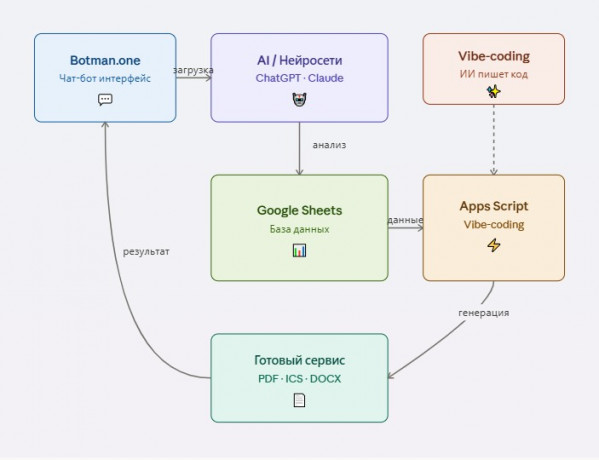
Imagine being able to create a professional web service capable of analyzing documents with AI, processing data, and generating files — all without programming knowledge. Sounds like fantasy? But it's a reality made possible by combining Botman.one, neural network integrations, and Google Apps Script.
The key idea is simple: Google Sheets acts as a database, while Botman.one with its AI integrations and Google Apps Script form a powerful technology stack for creating automated services.
How It Works: A Real Case Study
Let's look at a specific example — a service for automatically extracting deadlines from contracts and creating calendar reminders.
Solution Architecture
Step 1: Document Upload and Analysis A user uploads a PDF contract file to a chatbot on the Botman.one platform. The document, along with a specially crafted prompt, is sent to a neural network (such as ChatGPT or Claude), which analyzes the text and identifies all obligations with their execution deadlines.
Step 2: Data Normalization The AI output is processed again to convert the data into a structured format suitable for generating calendar events (ICS format).
Step 3: Saving to the "Database" The processed data is automatically saved to a Google Sheet — it acts as the database for the entire service. Each row contains information about an obligation, deadline, and contract parties.
Step 4: Calendar File Generation The user receives a message with a link. Clicking it triggers a script deployed on Google Apps Script. The script retrieves data from the Google Sheet and generates an ICS file that can be imported into any calendar (Google Calendar, Outlook, Apple Calendar).
Why Google Apps Script Is the Ideal Solution
Google Apps Script is a cloud platform for creating scripts that has native integration with Google Sheets. This means:
- Direct data access without API keys
- Free application hosting
- Ability to create web applications with URLs
- Automatic request handling
- Code can be written using ChatGPT even without programming experience
Vibe-Coding: When AI Writes Code for You
Here we come to a revolutionary concept — vibe-coding. This is an approach where you don't write code yourself, but describe your task to a neural network in natural language, and it generates a ready-to-use working script.
How It Works in Practice
Instead of studying Google Apps Script documentation, JavaScript syntax, and API specifics, you simply open ChatGPT or Claude and write:
"I need a Google Apps Script that:
- Takes data from the 'Contracts' Google Sheet (columns: obligation name, date, description)
- Generates an ICS calendar file with events
- Returns this file to the user when accessed via URL"
And the neural network gives you ready-made code with detailed comments, which you just need to copy into the Google Apps Script editor.
Practical Vibe-Coding Example
Your request to AI:
Write a Google Apps Script that:
- Accepts a GET request with userId parameter
- Finds all rows in the "Obligations" sheet where column A equals userId
- Creates an ICS file with events from columns B (title), C (date), D (time)
- Returns the file for download
What AI does:
- Generates complete working JavaScript code
- Adds error handling
- Comments each code block
- Provides deployment instructions
- Suggests how to get the web application URL
Advantages of Vibe-Coding
Development Speed From idea to working solution — 15-30 minutes instead of several days studying documentation.
No Entry Barrier No programming knowledge needed. Just clearly formulate the task.
Iterative Refinement Script not working? Simply copy the error into the AI chat, and it will fix the code. Need a new feature? Describe it — get an updated version.
Learning by Doing By studying the code that AI generates, you gradually begin to understand the logic and can make minor edits yourself.
Typical Vibe-Coding Workflow
- Task Formulation: describe what the script should do
- Code Generation: AI creates the first version
- Testing: copy code to Google Apps Script and run it
- Debugging: if there are errors, show them to AI
- Refinement: ask to add features or change logic
- Deployment: publish the script as a web application
Real Examples of Vibe-Coding Requests
For Lawyers:
- "Script that generates a PDF contract from table data, filling in a template"
- "Script to send email notifications 7 days before the deadline from the 'Deadline' column"
- "Script that checks for duplicate contractors by tax ID and highlights them in color"
For HR:
- "Script to generate a candidate report in PDF format with company logo"
- "Script that creates an interview calendar from a table and syncs with Google Calendar"
- "Script to automatically send a welcome email to a new employee from a template"
What Vibe-Coding Can Do Combined with Botman.one
When you combine Botman.one (for collecting data through a bot and AI processing) with Google Apps Script (written through vibe-coding), you get a powerful combination:
- Bot collects information from the user
- AI structures the data and saves it to a spreadsheet
- Script (written by AI) generates the result — document, report, file
- User receives the finished product via link
And to create such a service, you don't need to be a programmer.
Examples of Services for Lawyers
The synergy of Botman.one + AI + Google Apps Script (through vibe-coding) opens wide opportunities for legal practice:
1. Contract Analyzer with Checklist Generation
- Upload contract → AI identifies risks and obligations
- Data saved to table with categorization
- Script (written through vibe-coding) generates PDF checklist for contract compliance
- Automatic reminders about critical deadlines
2. Statute of Limitations Tracking System
- Upload legal relationship data
- AI determines applicable limitation periods
- Table tracks all cases with dates
- Automatic notifications 30/60/90 days before expiration (script written by ChatGPT)
3. Template Document Generator with AI Adaptation
- User describes the situation in chat
- AI asks clarifying questions and collects data
- Information is structured in a table
- Script generates contract/lawsuit/complaint from template with data insertion (code created through vibe-coding)
4. Counterparty Dossier
- User requests information by tax ID/company name
- AI analyzes open sources (through integrations)
- Data saved to dossier table
- Generates reliability report in PDF (generation through AI script)
5. Client Inquiry Management System
- Client describes problem in chat
- AI qualifies the legal situation
- Inquiry registered in table with unique number
- Automatic routing to lawyer by specialization
Examples of Services for HR
HR professionals can also significantly optimize their work:
1. Automated Resume Screening
- Candidate sends resume in PDF/DOC
- AI extracts key data (experience, skills, education)
- Structured data goes to candidate database table
- Automatic ranking by job match
- Generation of comparative candidate reports (script written by AI)
2. New Employee Onboarding System
- New employee answers bot questions
- Data saved to table
- Individual adaptation plan generated (PDF/ICS through vibe-coding script)
- Automatic task reminders for HR and manager
- Checklists for first day/week/month
3. HR Document Management Assistant
- HR describes situation (vacation, termination, transfer)
- AI determines necessary documents
- Templates pulled from reference table
- Script generates filled documents (code created through ChatGPT)
- Calendar of signing and registration deadlines
4. Learning and Development Tracker
- Employees complete surveys through bot
- AI analyzes training needs
- Data accumulated in table
- Automatic development plan generation
- Report generation by department (AI script)
5. Employee Satisfaction Monitor
- Regular anonymous surveys through bot
- AI analyzes text responses and identifies issues
- Aggregated data in table with visualization
- Automatic alerts at critical indicators
- Presentation generation for management (through vibe-coding)
Advantages of the Approach
For Business:
- Low Cost: no expenses for servers and complex infrastructure
- Fast Launch: from idea to MVP in days (or even hours with vibe-coding)
- Flexibility: easy to modify logic and add features — just ask AI
- Data Transparency: all information in an understandable table
For Developer/Automation Specialist:
- Simplicity: no need to set up databases
- AI Assistant: ChatGPT can write Google Apps Script scripts in minutes
- Ready Infrastructure: Botman.one provides interface and integrations
- Scalability: from MVP to full service without architecture change
- Zero Entry Barrier: programming not required — vibe-coding makes it accessible to everyone
Technical Capabilities
Modern AI (GPT-4, Claude) combined with Botman.one can:
- Extract structured data from unstructured texts
- Analyze documents in any format
- Classify and categorize information
- Generate texts from templates considering context
- Answer questions based on uploaded data
- Write working code for Google Apps Script for your task
Google Apps Script allows:
- Creating web applications with HTTP endpoints
- Generating files (PDF, DOCX, ICS, XLSX)
- Sending email notifications
- Integrating with other Google services
- Executing scheduled periodic tasks
Conclusion
The combination of Botman.one, AI integrations, and Google Apps Script is a no-code/low-code approach to creating complex automated services. Google Sheets becomes a full-fledged database accessible for analysis and editing, AI provides intelligent processing, and Google Apps Script provides flexible result generation.
Thanks to vibe-coding, you no longer need to be a programmer. Simply describe your task to ChatGPT or Claude, and the neural network will create a working script that you just need to copy and deploy. This is true democratization of development — complex services are now available to anyone who can formulate tasks.
This stack is especially effective for professional services — legal, HR, consulting — where document processing, information structuring, and routine process automation are required.
Start with a simple service, like the contract example, and gradually expand functionality. The technology entry barrier is now zero, and the potential for automation is enormous.